Hey there, and welcome to another deep dive into all things indoor fiber optics—your go-to spot for straight talk, no jargon, and real solutions from folks who’ve actually installed, troubleshooted, and sold this stuff for years. Today, we’re breaking down a question that hits our inbox at least 10 times a week from building managers, IT teams, and even small café owners who’re trying to upgrade their Wi-Fi or turn their office into a smart building: How do you properly route indoor fiber optic cables without turning your space into a tangled, costly mess? Indoor Fiber Optic
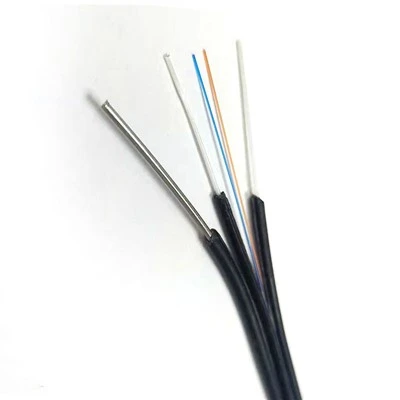
First off, let’s cut to the chase: Routing indoor fiber isn’t like stringing Ethernet cable around an office wall. Fiber is way faster, can carry way more data, and, yeah, it’s a little more finicky if you don’t treat it right. But here’s the good news: You don’t need to be a rocket scientist to do it right—you just need to know the ins and outs (pun totally intended) of what works, what doesn’t, and how to avoid the mistakes that end up costing you time, money, or even a full cable replacement.
Let’s start with the basics I wish I’d known when I first got started in this game: What kind of indoor fiber are we even talking about? Because not all fiber is made for indoor use. Outdoor fiber is thick, tough, built to survive sun, rain, and everything Mother Nature throws at it—totally overkill, and actually a bad call for inside a building. Indoor fiber, on the other hand, is smaller, lighter, and often plenum-rated. Wait, plenum? Yeah, that’s a big one. Plenum-rated cable is designed to be run through ceiling plenum spaces (the gaps above drop ceilings where HVAC runs) without releasing toxic fumes if it catches fire. Most commercial buildings require plenum-rated for those runs, so skip the cheap non-plenum stuff unless you’re just running a short run under a desk that no one will touch. We sell both, but always tell folks to match the cable to the space—saves way more headaches later.
Now, let’s get to the actual routing. This is where most people mess up, honestly. They grab a spool of cable, start running it around corners, yank it through holes like it’s a garden hose, and wonder why their signal drops a week later. Let’s break this down step by step, the way we teach our customers during their free setup guides:
First, do a pre-install walkthrough. Don’t skip this. I can’t tell you how many times a customer’s called me panicking because they just drilled a hole through a load-bearing wall, or ran a cable right on top of a HVAC vent that gets hot enough to melt the jacket. Grab a tape measure, a notebook, and walk every inch of the space you’re working on. Note where the existing data racks, IT closets, and end points (like office rooms, conference rooms, or lobby Wi-Fi spots) are. Mark any obstacles: pipes, ductwork, electrical wires (super important—fiber doesn’t carry electricity, but electrical runs can generate interference that kills your signal), and tight corners. Also, check the building’s blueprints if you can—most offices have these on file, and they’ll show you where studs, pipes, and other hidden stuff are. Trust me, this 30-minute step will save you hours of re-running cable later.
Next, choose your route type. There are a few standard indoor routing methods, and each is perfect for different spaces:
-
Surface mounting (for smaller spaces or retrofits). If you’re adding fiber to an old office that already has drywall, you don’t want to tear down walls. Surface mounting is exactly what it sounds like: you run the cable along walls, baseboards, or ceiling edges, secured with cable clips or raceways. Wait, raceways—those are the plastic or metal channels that hide the cable, right? We sell pre-cut raceways that are easy to install, and they make the whole thing look neat, not like a hot mess. Pro tip: Don’t run surface-mounted fiber along any place where people might bump it—like right at kid height in a classroom or right by a door where someone’s elbow swings. Secure every 18 inches or so, and use corner pieces for turns to keep the cable from kinking.
-
Concealed runs (for new builds or finished spaces). If you’re working on a new office or can cut small holes in walls/ceilings, this is the way to go. The most common route here is through wall cavities, ceiling plenum spaces, or under raised flooring (super popular in server rooms or modern offices with open floor plans). For plenum runs: use plenum-rated cable, obviously, and don’t run it alongside power cables if you can avoid it. Keep at least 12 inches away from electrical wiring—interference is the #1 enemy of fiber, even if you can’t see it. For wall runs: drill holes through studs, not through pipes or electrical lines (another reason those blueprints matter), and use rubber grommets to protect the cable from sharp wood edges. Sharp edges can nick the fiber jacket, which leads to signal loss over time.
-
Underfloor routing. If you’re in a commercial space with raised access floors (common in data centers, retail stores, or big offices), this is a clean, easy route. The floor panels sit on metal supports, so there’s a gap under them where you can lay the fiber. Just make sure the cable isn’t under any heavy equipment that might crush it, and avoid running it near air vents or humid areas—moisture can damage fiber, too.
Now, let’s talk about the big no-nos. These are the mistakes that we see every single day, and they’re so avoidable:
- Never exceed the bend radius. Fiber is delicate, and if you bend it too tight, you’ll crack the inner glass strands, killing your signal. What’s a safe bend radius? For indoor fiber, it’s usually around 10 times the cable’s diameter—so for a standard 3mm indoor fiber, that’s about an inch of space. Don’t pull it around corners sharper than that. We have little bend radius indicators on our cable spools if you forget, and we always include a quick guide in every order.
- Don’t yank the cable too hard. When you’re pulling fiber through holes or raceways, it’s tempting to give it a good tug to get it through fast—but that’s a surefire way to stretch or break the inner strands. Use a cable puller, not just your hands, and pull at a steady, slow pace (about 1 foot per second). If it gets stuck, don’t yank—loosen it, check for an obstacle, and try again.
- Keep it away from heat and moisture. Fiber’s jacket is tough, but constant heat from HVAC vents, radiators, or even direct sunlight (if you’re running it near a window) can break it down over time. And moisture? If water gets inside the cable ends or the jacket, it can cause signal loss, corrosion, or even total failure. So no running fiber through bathrooms, outdoor entry points that get rained on, or leaky ceiling spots.
- Don’t mix fiber with electrical cable. Like I said earlier, electrical wires generate electromagnetic interference (EMI) that can mess with fiber’s signal. Even if the fiber jacket is thick, running it right next to power cables for more than a few feet will cause slow speeds or dropped connections. If you have to cross them, do it at a 90-degree angle to minimize interference.
Wait, what about cable length? A lot of people ask us, “Can I just run a super long fiber cable to skip multiple runs?” Yeah, but there’s a limit. Single-mode indoor fiber can go up to 10km without a signal booster, but multi-mode is way shorter—usually around 550 meters for 10Gbps. So if you’re running a cable from your IT closet on the 1st floor to a conference room on the 10th floor, you’ll need a booster, or split the run with intermediate spots. We sell signal boosters too, so just ask if you’re unsure about lengths.
Now, the finishing touches. Once your cable is routed, you can’t just leave it hanging! You need to terminate the ends, secure any slack, and label everything. Terminating fiber is the process of attaching connectors (like LC or SC connectors, the most common indoor ones) to the ends so you can plug it into switches or access points. If you’re not comfortable doing that yourself, we can send a team to do it for you, or we have easy termination kits that come with step-by-step guides. Also, leave about 1-2 meters of slack in the IT closet and at each end point—this gives you room to adjust things later without having to re-run the whole cable. And label every cable with where it goes (like “Conference Room 3, Fiber to AP”)—trust me, you’ll thank yourself a month from now when something goes wrong and you don’t have to trace 20 cables.
Let me wrap this up with a real example, because that’s how we learn. Last month, a small marketing agency called us because they tried to run fiber themselves, and a week later, their Wi-Fi was super slow. They’d run the cable through their ceiling plenum, right next to the power cables for their office printers, and bent it around a corner so tight the inner strands were cracked. We sent our team out, replaced the bad cable, re-routed it away from power, and fixed the bends. Cost them a third of what it would’ve cost if they’d waited even longer, and their speed was back to full gigabit.
At the end of the day, routing indoor fiber isn’t rocket science, but it does need a little planning and the right supplies. If you’re not sure where to start, or you need advice on which cable or tools to use, we’re here to help. Whether you’re a building manager looking to upgrade your office, a small business owner setting up a retail space, or an IT team planning a new build, we’ve got the indoor fiber products and expertise to get the job done right, the first time.

If you’re ready to get the process started, or you just have questions about specific spaces (like data centers, schools, or warehouses), don’t hesitate to reach out to our team for procurement and project planning. We’ll walk you through every step, no fine print, no confusing jargon—just honest advice and quality products that’ll stand the test of time.
GYDTA References:
- TIA-569-C: Telecommunications Pathways and Spaces Standard
- Fiber Optic Association (FOA): Indoor Fiber Installation Best Practices Guide
- National Electrical Code (NEC) Article 770: Optical Fiber Cables
Guangdong Shengtang Optical Cable Communication Equipment Co., Ltd.
As one of the most professional indoor fiber optic manufacturers and suppliers in China, we’re featured by quality products and good price. Please rest assured to buy bulk durable indoor fiber optic in stock here from our factory. Customized orders are welcome.
Address: The 6th floor of Building B3, located on the south side of Jingyi Road, Shiwan Town, Boluo County, Huizhou City, Guangdong Province.
E-mail: gdshengtang@gmail.com
WebSite: https://www.gdstcable.com/
